AI Virtual Try-On for Men: Shirts, Suits and Casual Outfits
Use AI virtual try-on for men to preview shirts, suits, jackets, and casual outfits on your photo before buying or planning what to wear.
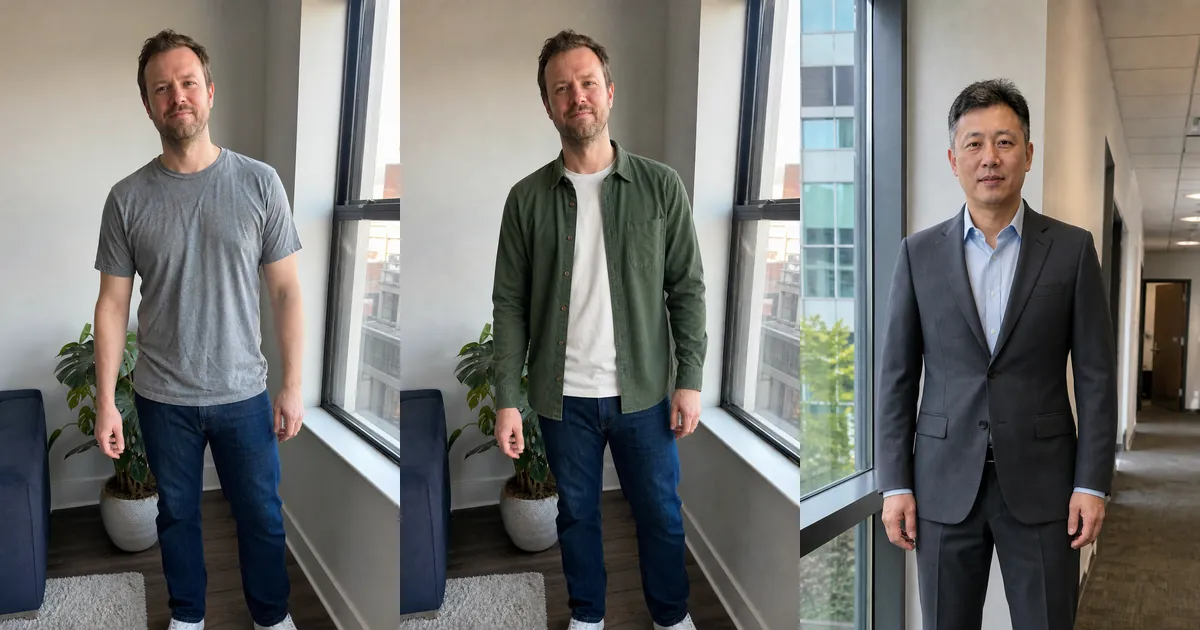
AI virtual try-on for men lets you preview shirts, suits, jackets, and casual outfits on your own photo before buying or planning a look. Instead of judging clothes only on a retailer's model, you can compare how different colors, collars, layers, lengths, and levels of formality work with your appearance.
The result is a visual styling aid, not a digital tailoring appointment. A men's virtual fitting room can help answer whether you prefer a navy or charcoal suit, an open overshirt or a polo, or a relaxed versus smarter outfit. It cannot confirm chest measurements, sleeve movement, fabric feel, or the exact size to order.
How to try on men's clothes online with AI
- Upload a clear photo facing the camera with your arms visible and relaxed.
- Choose a garment from the available collection or upload a clean product image.
- Generate the outfit preview and inspect your face, body proportions, hands, and garment details.
- Repeat the strongest option and compare consistent features rather than relying on one result.
- Check the retailer's measurements, fabric, fit notes, reviews, and returns before purchasing.
Original men's shirt and suit examples
These original examples start with natural everyday photographs and preserve the same person, posture, environment, and lighting in the clothing edit. The first comparison tests a casual layer; the second moves from a polo-and-chinos combination to business tailoring.
Drag each slider to compare the shirt structure, color, layering, suit lapels, jacket length, trouser line, and overall formality.
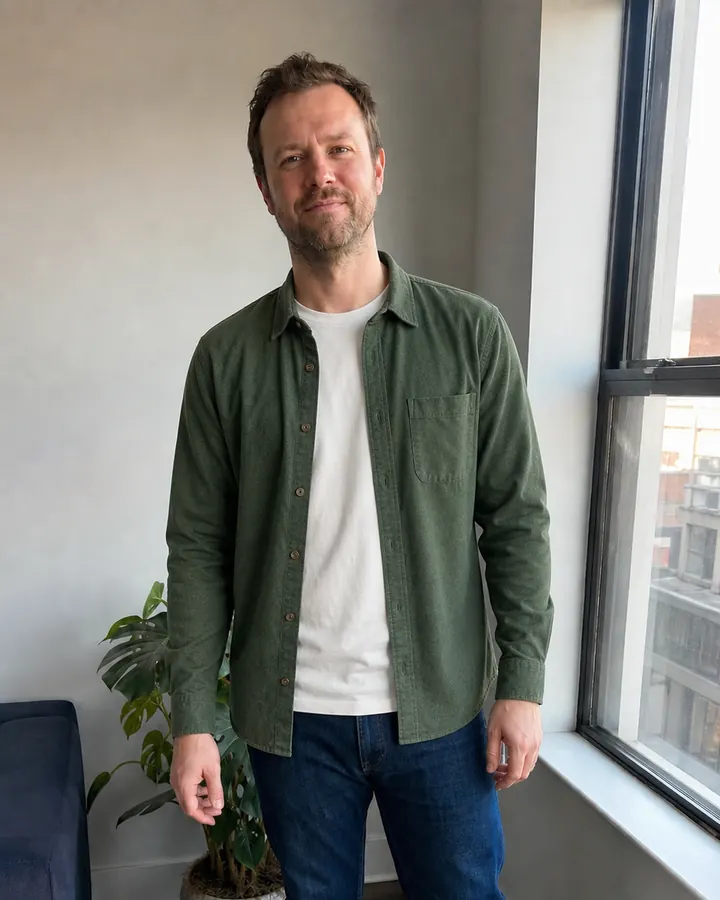
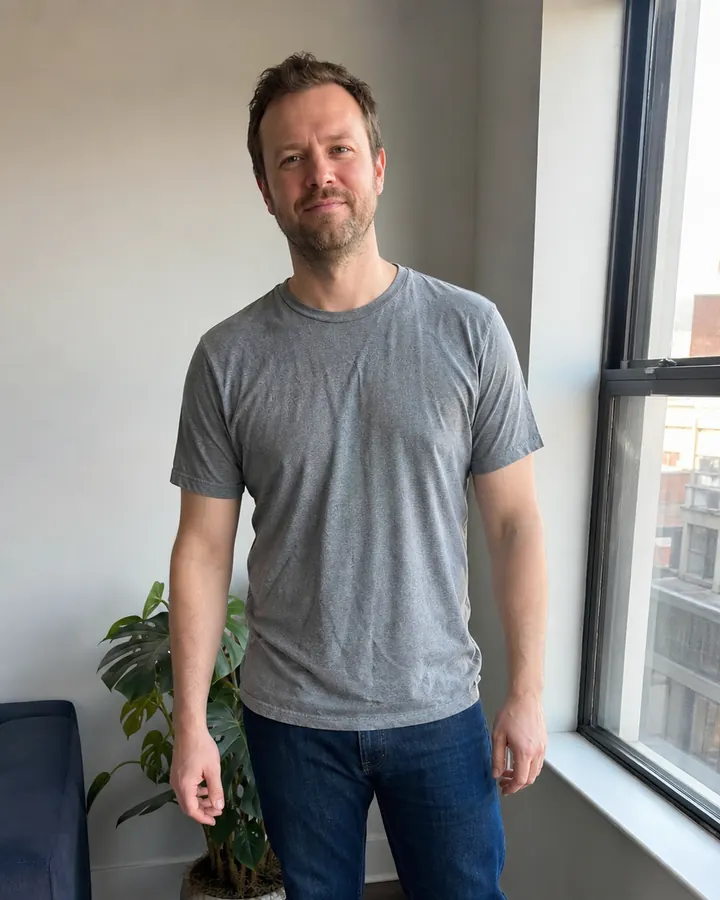 BeforeAfter
Men's shirt try-on · Forest-green Oxford overshirt

 BeforeAfter
Men's suit try-on · Charcoal business suit
Virtual shirt try-on for men
Shirts are useful for testing color near the face, collar shape, sleeve coverage, layering, pattern scale, and hem length. Try an Oxford shirt, overshirt, polo, linen shirt, flannel, or dress shirt on the same source photo. For a fair comparison, change one decision at a time—for example blue versus green while keeping the shirt style similar.
A waist-up photo may be enough when only the shirt matters, but it should include both shoulders, sleeves, hands, and the complete hem. If the shirt will be worn with trousers or under a jacket, use a longer crop so you can judge the complete combination rather than an isolated top.
Virtual suit try-on for work, weddings, and events
A virtual suit try-on helps compare navy, charcoal, black, brown, or lighter seasonal tailoring before committing to a purchase. Look at lapel width, jacket length, button position, shoulder line, shirt color, tie choice, trouser shape, and how formal the complete outfit feels. Use a full-body photo whenever the trousers and shoes are part of the decision.
Treat the preview as inspiration, especially for weddings, interviews, presentations, and formal dinners. AI may draw a clean-looking jacket even when a real garment needs alteration. Confirm chest, shoulder, waist, inseam, rise, and sleeve measurements separately, then allow time for tailoring when the occasion matters.
Preview casual outfits and smart-casual layers
Men's casual outfit try-on is valuable when the question is not simply 'Does this fit?' but 'Does this combination feel like me?' Compare T-shirts, polos, overshirts, denim jackets, bomber jackets, knitwear, chinos, and jeans. You can also test whether one added layer makes a basic outfit look more intentional without becoming too formal.
Keep the starting photo and pose unchanged while comparing options. If every generation changes the hairstyle, body shape, background, or camera angle, the comparison becomes less useful. A believable result should preserve your identity and let the clothing—not a newly invented person—create the difference.
Use better person and garment photos
- Use even daylight, a level camera, and a relaxed front-facing posture.
- Wear simple starting clothes instead of a bulky coat or heavily layered outfit.
- Use full-body framing for suits, trousers, coats, and complete casual looks.
- Choose a front-facing garment photo with the collar, sleeves, fastening, pockets, and hem visible.
- Crop away prices, menus, promotional labels, other products, and obstructing poses.
What to check in an AI men's outfit preview
Inspect the neckline, collar, shoulders, sleeve ends, buttons, pockets, waist, hem, hands, and any repeating pattern. Reject a result if it changes your face or proportions, duplicates fastenings, melts fingers, breaks stripes, or invents garment details. For an important purchase, generate the same option again and trust details that remain stable across believable previews.
Use any Try button on this page to open InFashi's AI clothes tool, or continue in the Android app from the action panel. Start with two or three genuinely different men's outfits, build a visual shortlist, and then use real measurements and retailer information to make the final buying decision.
Frequently Asked Questions
- Can men virtually try on clothes with a photo?
- Yes. Upload a clear front-facing photo, select or upload a men's garment, and generate a visual outfit preview. Use the result to compare style, color, silhouette, and layering rather than to confirm an exact physical size.
- Can I virtually try on men's shirts online?
- Yes. A waist-up photo can work for many shirts, but include the full sleeves and hem. Use a clean garment image that clearly shows the collar, buttons, cuffs, pattern, and overall cut.
- Can AI show what I would look like in a suit?
- AI can create a useful visual suit preview for comparing color, lapel style, jacket length, shirt-and-tie combinations, and overall formality. It cannot guarantee tailoring, measurements, movement, or comfort.
- What photo works best for men's virtual try-on?
- Use a sharp, evenly lit, front-facing photo with relaxed shoulders and arms slightly away from the torso. Include your full body for suits, trousers, coats, and complete outfits, and avoid bulky layers or obstructions.
- Is AI virtual try-on for men a size finder?
- No. Virtual try-on mainly answers visual questions about style and appearance. Check the retailer's current size chart, garment measurements, fabric, fit notes, reviews, and return policy before ordering.
Try it on InFashi
Upload a photo in your browser, or download the Android app and preview your look on your phone.