How to Plan a Week of Outfits With AI
Plan a practical week of outfits around your calendar, weather, laundry, and existing wardrobe, then preview uncertain combinations with AI.
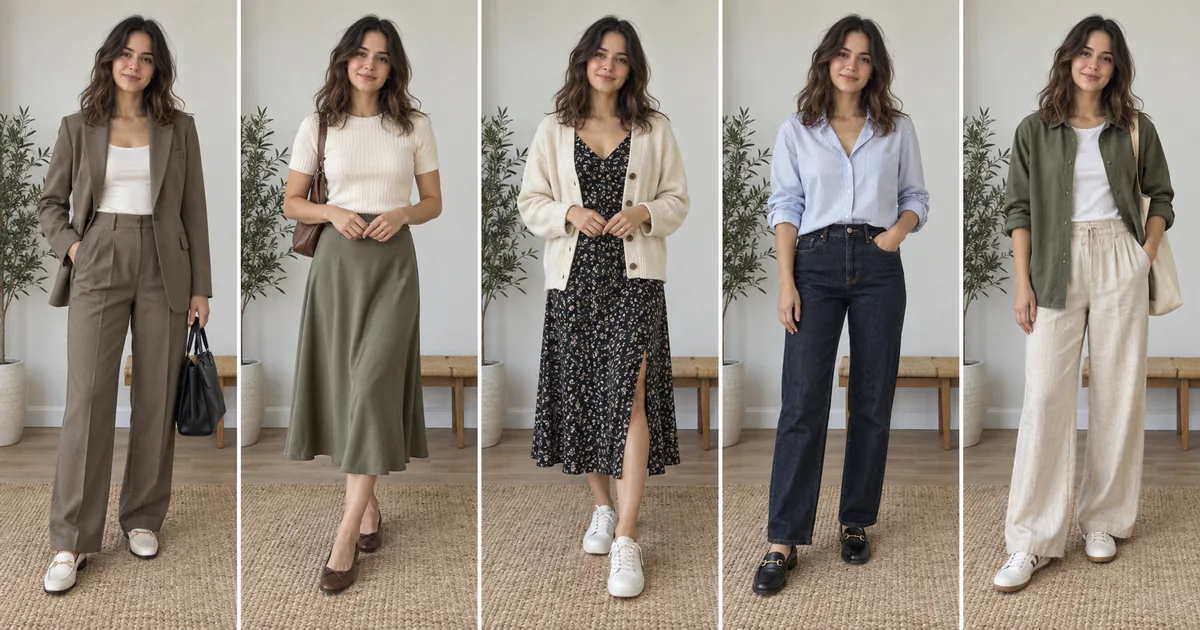
Planning outfits for the week can reduce rushed decisions, reveal laundry problems early, and help you use more of the clothes you already own. The plan should remain flexible: meetings move, weather changes, and a carefully prepared outfit may feel wrong on the day. Think of it as a useful shortlist rather than a rigid schedule.
AI is most helpful when one combination is difficult to imagine. Preview a jacket over a dress, a new color with familiar trousers, or a more polished version of a casual base. It should support the planning process, not replace checking your calendar, forecast, laundry, and real clothes.
Plan five outfits in seven steps
- Review work, travel, exercise, dinners, appointments, and dress codes for each day.
- Check the local forecast, including morning and evening temperatures and precipitation.
- Choose shoes and required outerwear first for weather-sensitive or walking-heavy days.
- Build each outfit from clean clothes you already own and include underwear and accessories.
- Use AI only for uncertain combinations, keeping the same personal photo for comparisons.
- Try on the real outfits, check movement, and place complete looks together.
- Prepare one adaptable backup and revise the plan when conditions change.
What the five-look comparison demonstrates
The original image above holds one fictional model and setting constant across five weekday looks: tailored trousers, a knit and skirt, a dress with cardigan, a blouse with jeans, and relaxed trousers with an overshirt. It demonstrates variety through formulas and layers rather than five unrelated wardrobes. You can repeat the method with your own schedule.
Start with fixed requirements
Place the least flexible days first. A presentation, interview, site visit, long commute, or outdoor event may determine footwear, coverage, safety needs, or outerwear. Then fill simpler days using repeatable combinations. This prevents an attractive but impractical look from consuming the only clean trousers or weatherproof shoes you need later.
Repeat pieces intentionally
Repeating shoes, trousers, jackets, and bags is efficient, not a planning failure. Change the top, layer, or accessory while keeping dependable foundation pieces. Confirm that reused items will remain clean and available. If an outfit depends on laundry halfway through the week, put that step into the plan rather than assuming it will happen.
Use AI for one controlled question
Ask whether a camel blazer works with navy trousers, whether a cardigan balances a midi dress, or whether darker jeans make a casual Friday outfit more polished. Change one variable at a time. If the generator changes your body, face, pose, or multiple garments, the comparison is no longer reliable enough to guide the decision.
Prepare cleaner outfit references
Use garment images that show the whole item without menus, text, hands, or overlapping accessories. A complete outfit reference is useful when you want the overall direction; a single-garment reference is better when you need to compare one jacket, top, or pair of trousers. Keep screenshots organized by day so the planning set does not become another source of clutter.
Label saved results with the occasion or weekday rather than trusting your photo gallery order. Remove previews that contain changed faces, uneven sleeves, merged hands, or invented garments. A smaller folder of credible options is more useful than dozens of attractive but inconsistent generations.
Do a real-world check before Monday
Try on complete outfits and sit, walk, bend, and raise your arms. Inspect the clothes in ordinary light, check shoes, locate missing buttons, and steam or repair items in advance. AI cannot detect discomfort, stains, transparency, static, fabric wear, or an inaccurate size. Those practical checks are the value of planning early.
Use any Try button to open InFashi's clothes uploader, or continue in the Android app from the action panel. Save only believable visual comparisons, then keep your final weekly plan simple enough to change when real life does.
Frequently Asked Questions
- When should I plan my outfits for the week?
- Choose a consistent time when the upcoming calendar and forecast are reasonably clear, such as Sunday evening. Recheck weather-sensitive outfits the night before because forecasts and plans can change.
- Can AI automatically plan outfits from my whole closet?
- InFashi previews selected clothes on your photo; it does not automatically inventory every garment you own. Begin with a real wardrobe check and use AI for combinations you want to visualize.
- How many backup outfits should I prepare?
- One weather-flexible backup and one slightly more polished option are often enough. Your needs may differ if the week includes travel, uniforms, formal events, or rapidly changing weather.
- Does an AI outfit preview confirm fit or comfort?
- No. It can help compare style, color, and proportion, but you must try on the real clothes to check movement, fit, fabric, and comfort.
Try it on InFashi
Upload a photo in your browser, or download the Android app and preview your look on your phone.