AI Bikini Changer: Virtually Try On Bikinis Using Your Photo
Use an AI bikini changer to preview bikini and swimwear ideas on your photo, prepare better inputs, compare results, and understand fit limitations.
An AI bikini changer lets you upload a normal, fully clothed photo and preview a bikini or other swimwear style on that image. It can help you compare color, neckline, strap width, waist height, and how a beach look works with a cover-up before buying. It is a visual planning tool, not a digital fitting room that measures your body.
The most useful comparison changes one variable at a time. Keep your source photo fixed, begin with one swimwear reference, reject distorted results, and then test a second option. This gives you a clearer answer than generating many unrelated images with different poses and lighting.
How to virtually try on a bikini using your photo
- Open InFashi's AI clothes changer and upload a clear, fully clothed full-body photograph.
- Choose swimwear from an available collection or upload a clean product image showing the complete bikini.
- Generate the preview and check whether your identity, body proportions, pose, hands, and background remain consistent.
- Repeat with the same personal photo when comparing another color, top shape, or waist height.
- Save only believable results and verify every real product detail before buying.
Prepare a better source photo
Stand facing the camera in even light with your complete body visible. Keep your arms a small distance from your torso and use a natural stance. A fitted T-shirt with leggings, shorts, or straight trousers usually gives the generator clearer body boundaries than a bulky sweater, long coat, crossed arms, large bag, or seated pose.
Use an ordinary camera perspective around waist or chest height rather than a dramatic wide-angle selfie. Avoid beauty filters and mirrors that obscure part of the body. You do not need to upload an underwear or swimwear photograph to create a clothing preview; a clear, fully clothed image is the safer and more practical starting point.
Use a clean bikini reference
A product image works best when the top and bottom are fully visible against a simple background. Crop out menus, prices, text, and unrelated accessories. If the bikini is shown only on a model in a strong pose, the generator may borrow that pose or misread the garment. Separate front and back product photographs when you need to understand coverage; one AI preview cannot reliably show both.
What to inspect in the result
- Whether both straps connect naturally and have consistent width.
- Whether the neckline, waist, and leg openings remain symmetrical.
- Whether your face, shoulders, waist, hips, and legs keep their original proportions.
- Whether prints, rings, ties, seams, and hardware match the real product reference.
- Whether hands, hair, and cover-ups overlap the swimwear realistically.
The original flat-lay shows the decision clearly
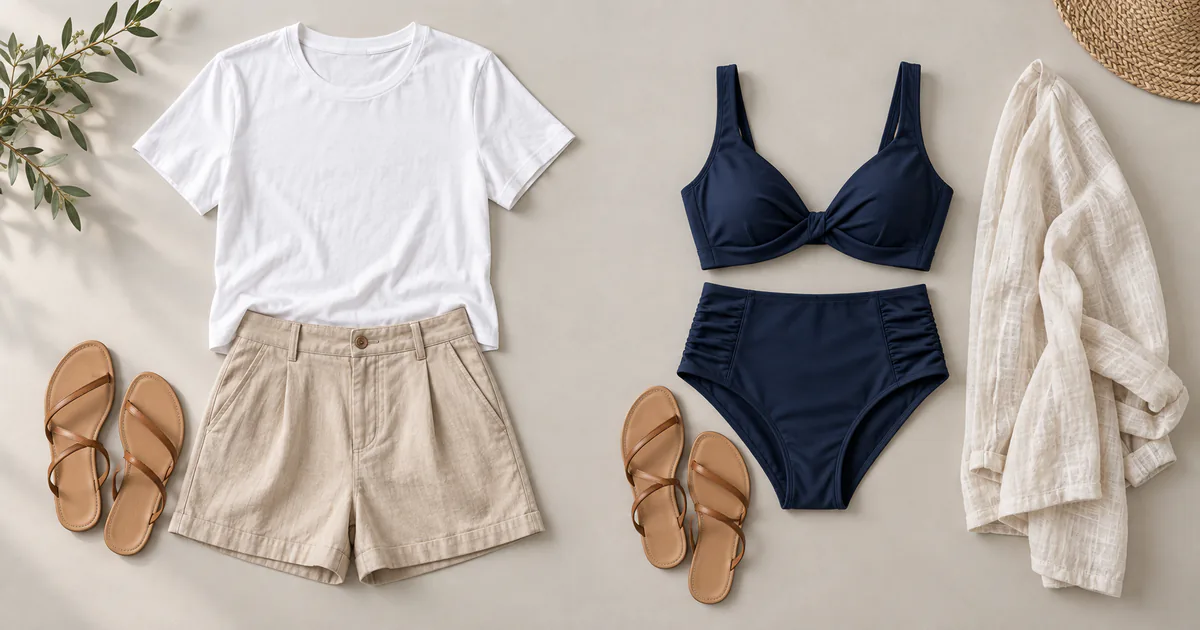
The image above compares a simple T-shirt-and-shorts outfit with a navy high-waisted bikini, sandals, and linen cover-up. It was created specifically for this guide to show the clothing references without suggesting that an AI render proves fit. A clean reference like this gives the system clearer information about garment shape and color.
What an AI bikini changer cannot determine
AI cannot confirm band or cup support, exact coverage during movement, fabric stretch, lining, transparency when wet, comfort, durability, or correct size. It may also make subtle body changes that make a style look more convincing than it would in reality. Compare the result to your original photograph and discard any preview that alters your proportions.
Before ordering, use the retailer's size chart and your current measurements. Read material and lining information, look for adjustable straps or removable cups if those features matter, and confirm hygiene seals and return restrictions. Swimwear returns can have special conditions, so review the current policy before purchase.
Keep privacy and consent part of the workflow
Upload only your own photograph or one you have clear permission to use. Choose a normal clothed source image and avoid including other people, personal documents, home addresses, school details, or unnecessary background information. Review InFashi's privacy information before uploading if you want to understand how the service handles account and image data.
Use any Try button to open the InFashi clothes uploader. On Android, you can also continue in the app through the action panel. Compare a small set of realistic previews, then make the final decision using the real product specifications, your measurements, and physical comfort.
Frequently Asked Questions
- Can I use AI to change clothes to a bikini in a photo?
- Yes. Upload a clear photo of yourself and a clean bikini or swimwear reference, then generate a visual outfit preview. Use only images you own or have permission to use.
- What photo works best for an AI bikini changer?
- Use a sharp, well-lit, front-facing, fully clothed photo with your full body visible and arms slightly separated from your torso. Avoid crossed limbs, oversized coats, bags, and strong shadows.
- Can virtual bikini try-on find my correct size?
- No. It previews color and overall visual style. It cannot measure your body or confirm band support, cup fit, coverage, stretch, comfort, or the retailer's sizing.
- Is an AI bikini preview identical to the real product?
- No. Generated previews may simplify straps, seams, hardware, prints, texture, and coverage. Always check the retailer's product photographs, measurements, materials, and return policy.
- Should I upload another person's photograph?
- Only upload a photograph when you own it or have the person's clear permission. Review the service's privacy policy before uploading personal images, and avoid unnecessarily sensitive photographs.
Try it on InFashi
Upload a photo in your browser, or download the Android app and preview your look on your phone.