How to Preview a Haircut Before Your Salon Visit
Preview a haircut on your photo before the salon, compare styles fairly, avoid misleading AI results, and prepare a practical visual brief for your stylist.

A haircut changes how the forehead, cheekbones, jaw, and neck are framed, but a reference photograph usually shows someone with a different face, hairline, density, texture, and styling routine. An AI hairstyle changer can place a haircut idea onto your own portrait so you can explore the direction before making a difficult-to-reverse change.
The preview should guide a conversation, not promise an identical salon result. Real hair reacts to growth direction, cowlicks, shrinkage, weight, humidity, heat styling, and daily maintenance. Use AI to identify the length and shape you prefer, then ask a stylist what is realistic for your hair.
How to preview a haircut before the salon
- Take a sharp front-facing portrait with your head level and hairline visible.
- Choose a hairstyle from the collection or upload a clean reference photograph.
- Generate the preview and inspect your identity, face shape, hairline, jaw, ears, and shoulders.
- Repeat with the same source photo when comparing another length or fringe.
- Save two or three believable options and discuss them with your stylist.
Bad source photo versus a better haircut photo
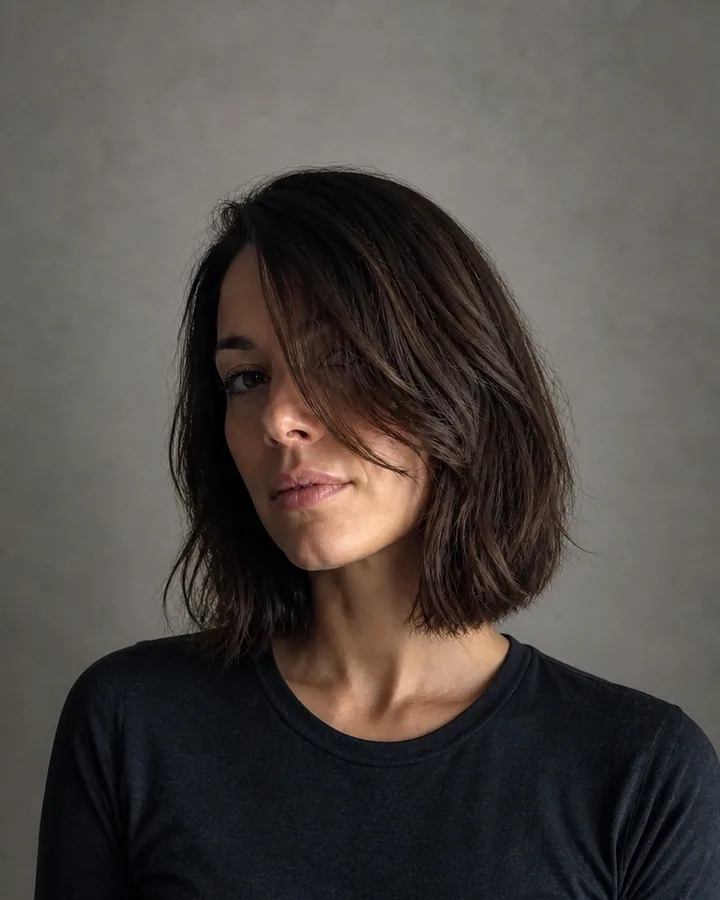
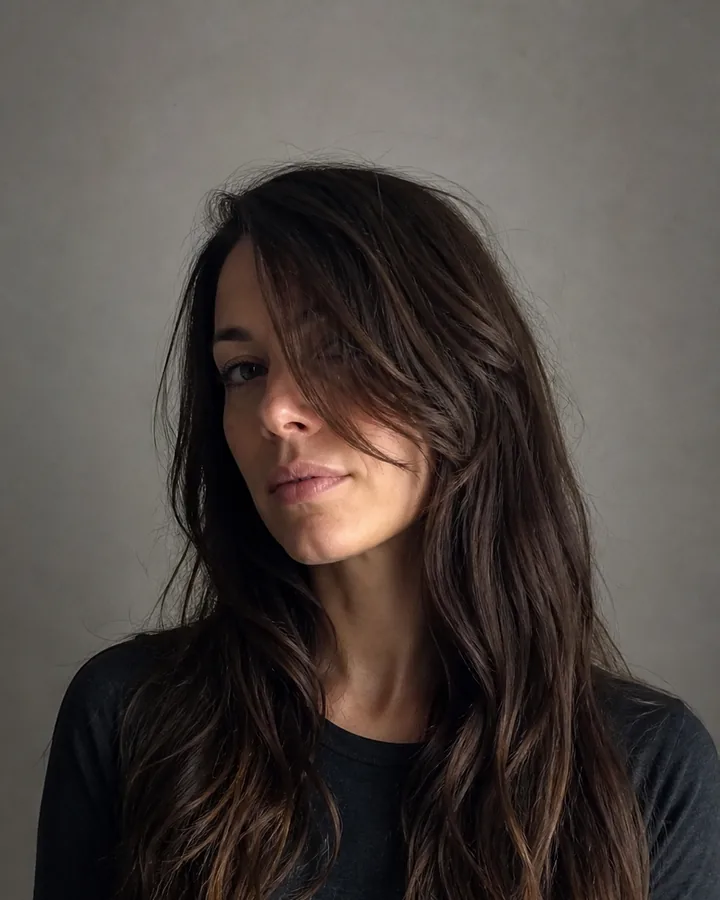
The following controlled examples use two newly generated models rather than customer photographs. Both attempt a similar chin-length bob. The first source has a turned, tilted head, hair covering part of the face, and uneven light. The second is front-facing with a level head, visible jaw, clear hairline, and balanced daylight.
Drag each slider. The angled example provides less dependable information about symmetry, exact jaw length, and the hidden side. The clear portrait makes the bob outline and its relationship with the face easier to evaluate.
 BeforeAfter
Difficult haircut source photo · Angled photo to chin-length bob

 BeforeAfter
Recommended haircut source photo · Front-facing photo to chin-length bob
Why the second source works better
- Both eyes and ears are at similar heights, giving the generator a stable horizontal reference.
- The forehead, hairline, cheeks, jaw, and neck are visible instead of hidden by hair.
- Even lighting prevents a shadow from being interpreted as part of the hairstyle or face edge.
- The simple background separates individual hair strands from the environment.
- The shoulders remain square, making overall length and balance easier to compare.
Compare haircut length and shape fairly
Keep the personal photo fixed and change one major feature at a time. Compare chin-length, shoulder-length, and collarbone-length cuts before changing color or texture. Then test a blunt outline against soft layers, or no fringe against curtain, wispy, blunt, or side-swept bangs. Controlled comparisons reveal which feature actually changes your preference.
Check whether your face, eyes, eyebrows, nose, mouth, skin texture, head size, neck, and shoulders remain consistent. Reject generations that reshape the jaw, move facial features, change age, create a wig-like edge, merge hair with clothing, or place both sides at impossible lengths.
Consider texture, density, and maintenance
A reference may be styled with extensions, hot tools, professional products, or naturally different density. Straight, wavy, curly, and coily hair can finish at different apparent lengths after drying. Fine hair may not hold the same volume as dense hair, and a strong cowlick can change fringe placement. Ask how the cut behaves without salon styling and how often it needs trimming.
Choose a useful hairstyle reference
Use a sharp image that shows the front clearly and, when possible, find separate side and back views of the same cut. References with a natural texture similar to yours are easier to discuss. Crop away social-media interface elements and avoid images where hats, hands, wind, or dramatic posing hide the outline.
Turn your preview into a salon brief
- Point out the desired shortest and longest areas instead of requesting only a style name.
- Explain whether you want a blunt perimeter, internal layers, face framing, or a fringe.
- Discuss your natural texture, usual part, cowlicks, heat styling, and wash routine.
- Ask how the cut will grow out and how frequently it needs shaping.
- Show the AI preview together with real haircut references from multiple angles.
Test hair color separately from the cut
If you are also considering a color change, choose the haircut shape first and test color in a separate comparison. Changing length, texture, fringe, highlights, and base color at once makes it difficult to identify what you actually prefer. Remember that screens cannot predict the exact salon tone or how lightening will affect the condition of your hair.
Use any Try button on this page to open InFashi's AI hairstyle changer, or download the Android app from the action panel. Generate a small set of believable previews, keep the original source photo for comparison, and let your stylist adapt the idea to your real hair rather than copying the generated image literally.
Frequently Asked Questions
- Can I preview a haircut before going to the salon?
- Yes. Upload a clear portrait, select or upload a hairstyle reference, and generate an AI preview. Use it to explore length, shape, fringe, and color before discussing the idea with a stylist.
- What photo works best for an AI haircut preview?
- Use a sharp, front-facing photo with your head level, even daylight, visible hairline, and hair moved away from the cheeks and jaw. Avoid filters, hats, strong shadows, and extreme angles.
- Will an AI hairstyle look exactly the same after a real haircut?
- No. Your hair density, texture, growth pattern, cowlicks, styling routine, and the stylist's technique affect the real result. Treat the preview as a communication aid rather than a guarantee.
- Can I upload a haircut reference from another website?
- Yes. Choose a clear reference that shows the cut from a similar angle and has a reasonably similar natural texture. Bring additional side and back references to the salon when those views matter.
- How many hairstyles should I compare?
- Start with three meaningful options: one familiar length, one moderate change, and one bolder cut. Too many unrelated previews can make the decision less clear.
Try it on InFashi
Upload a photo in your browser, or download the Android app and preview your look on your phone.